Learn robot kinematics on a real arm
A 3D simulator of the Annin AR4, a six-joint desktop robot arm. Move it joint by joint or along straight lines, see every inverse-kinematics solution, meet its singularities, plot the joint motion, and program it to pick, place and stack.
Enter the class
Use the class code your instructor gave you. You only do this once on each computer.
Welcome back,
Open the simulator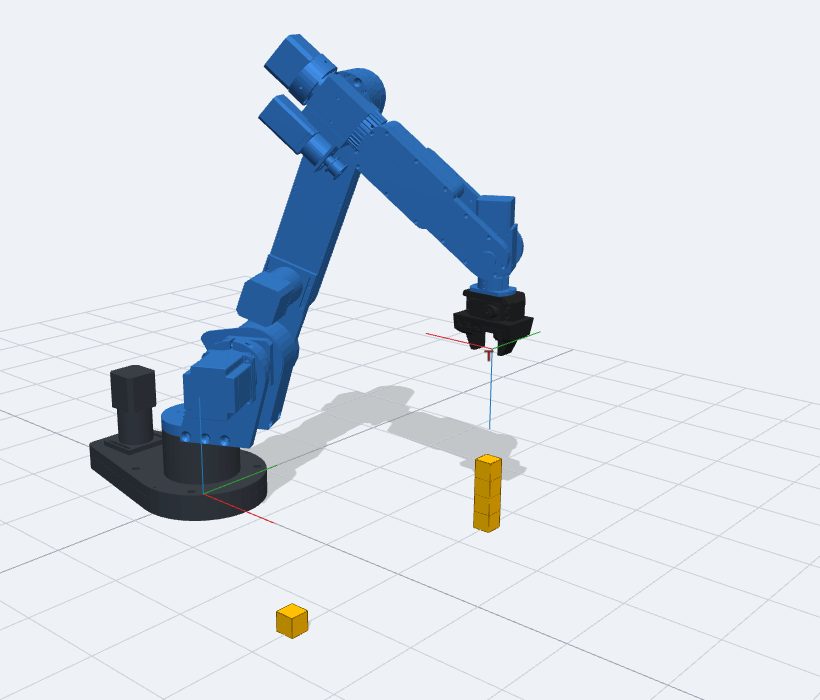
What you can do
Joints and DH frames
Drive the six joints within the real limits and show the Denavit–Hartenberg frames, the tool frame and the transformation matrices.
Jog the tool
Move the tool along X, Y, Z or turn it about Rz, Ry, Rx, in the base or the tool frame, the way an industrial teach pendant does.
Every IK solution
Type a pose and see all its inverse-kinematics solutions, which ones the joint limits allow, and jump to any of them.
Singularities and workspace
Watch a wrist singularity make the joints race, see a straight line stop at a joint limit, and draw the reachable workspace.
Joint motion plots
Angle, velocity and acceleration of every joint for MoveJ and MoveL, with the data to download for your report.
Pick, place and stack
Teach a program, grip cubes with the servo gripper and build a tower in a loop, like a robot cell in a factory.
Before you start
Use Chrome, Edge or Firefox on a computer (a phone works, but the screen is small). You need an internet connection: the robot's calculations run on this site's server.
What this site keeps
Your name, student ID, class code and how much you used the simulator, so your instructor can see who took part. No passwords, no e-mail, nothing else. The site remembers you with one cookie for 30 days.